

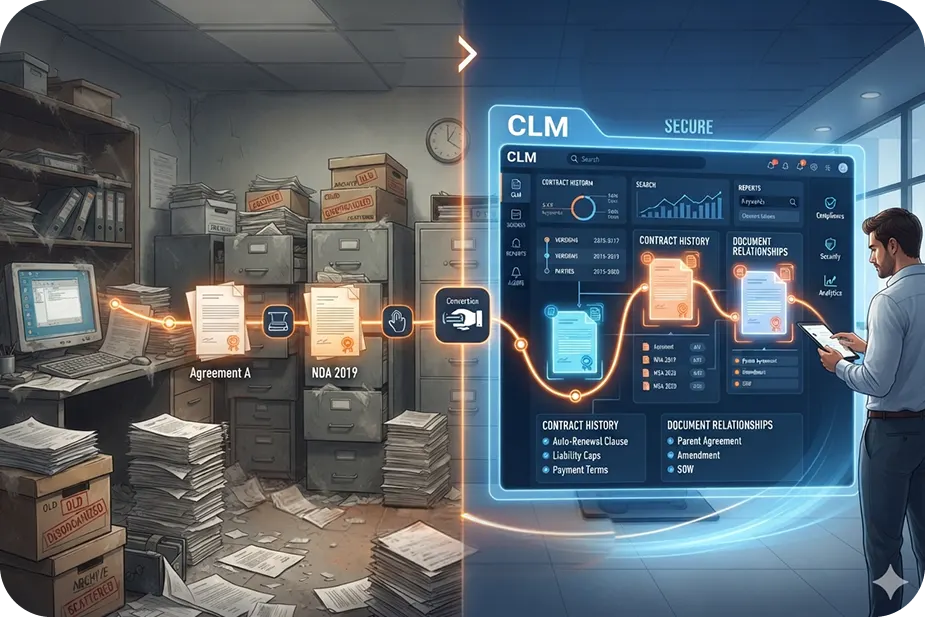
I see contract migration as a question of legal continuity before I see it as a question of technology.
Gone are the days when legal work depended on paper files and long paperwork trails. Legal departments now need systems to streamline contract management and access.
However, every contract carries a history of changes that shapes the legal position the business relies on today.
Changes made to a contract over time, through amendments, renewals, assignments, or other documents, determine the legal position the business relies on today.
A new system should give the business a better way to work with its contracts without disturbing the legal position those contracts have built over time.
That is the continuity migration has to protect.
What is contract migration?
In textbook terms, contract migration literally means moving a contract into a new system.
Now, that still does not explain much. So, to understand it better, it helps to first look at what a typical contract actually contains.
In simple terms, a contract can be defined as a form of agreement between two or more parties, which consists of items such as dates, signatures, parties involved, obligations, terms and conditions, payment details, among others.
A lot goes into drafting a contract. There are legal nitty-gritties that have to be checked carefully, which is why moving that contract into a new system is also a responsible job.
Migrating requires proper diligence because you are moving the legality that makes the contract useful.
In case you miss out on a particular date or you separate the amendment from the main agreement, there may be problems resulting from the contract in the future. This is the due diligence aspect of contract migration.
When do you need contract migration?
You need contract migration when your contracts have to move from one place or system to another.
Common situations where contract migration happens
- You move to a new contract system and need to bring your existing contracts with you.
- Your contracts are stored in different places and you want to bring them together.
- Your company goes through a merger or acquisition and the contracts from both businesses need to be organized in one place.
What does contract migration include?
Contract migration covers the contract documents as well as the information needed to understand and manage them in the new system.
Some of this information may also need to be cleaned or reorganized before it moves. For example, duplicate records may need to be removed, old information corrected, and related documents connected properly.
The new system should give teams enough information to find the right contract and act on what it requires today.
What is the contract migration process?
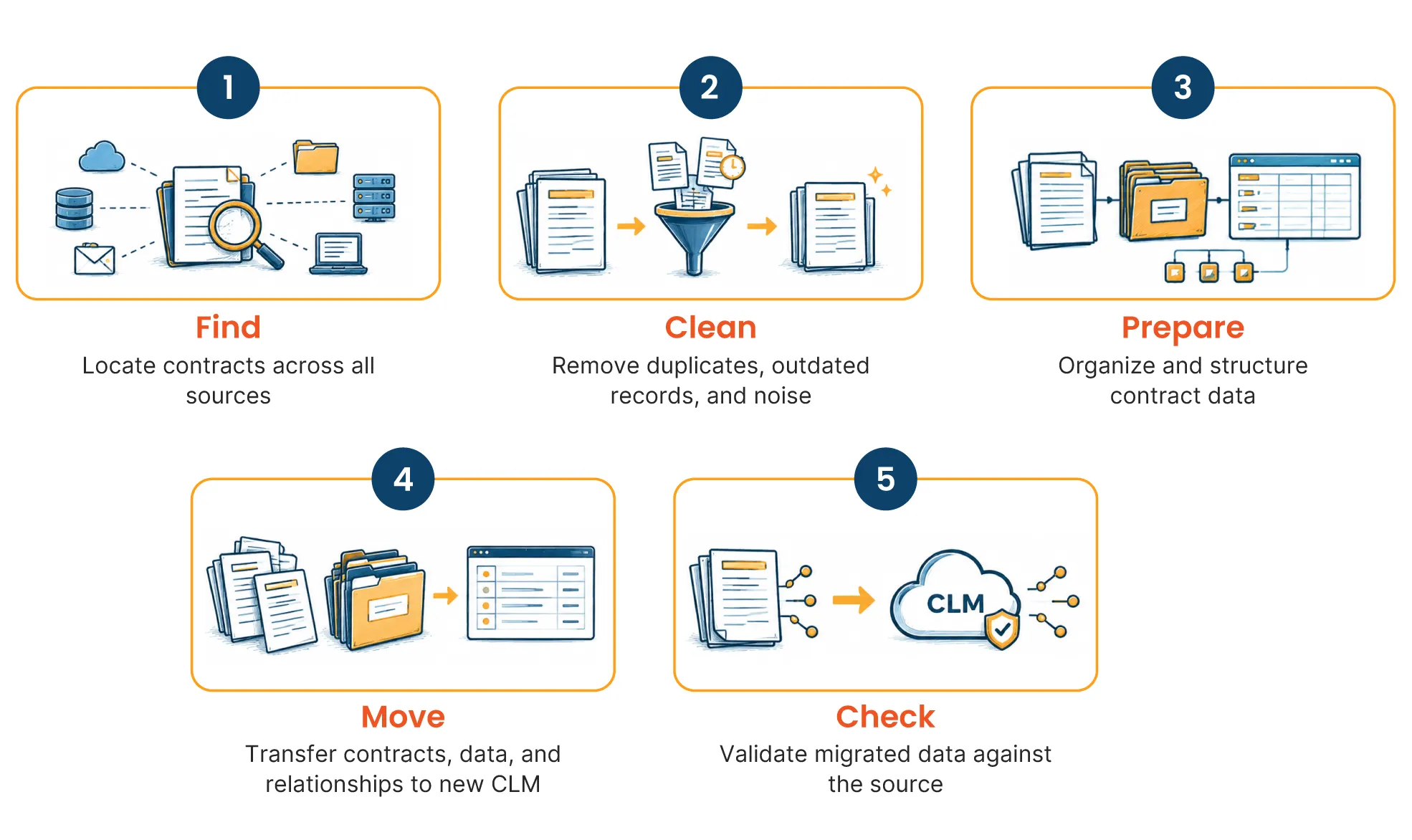
A contract migration moves through five stages.
1. Find out what you have
Start by locating the contracts that need to move.
They may sit in an old CLM, shared drives, email folders, scanned files, or different systems across the business.
BNY Mellon, for example, centralized more than 78,000 contracts from different systems with Sirion. More than 100 metadata fields were also extracted from those contracts.
At this stage, the aim is simply to understand what exists and where it is.
2. Clean up the contracts
Before moving anything, review what you found.
Remove obvious duplicates, separate drafts from signed contracts, and organize documents that belong together.
3. Prepare the contracts for the new system
Next, decide how the contracts and their information will appear in the new CLM.
This includes matching important details such as parties, dates, contract types, obligations, and renewal information to the fields used by the new system.
Teams still selecting their platform can review LegalEase's 2026 CLM software comparison.
4. Move the contracts and their data
The contracts can now be loaded into the new system along with the information prepared for them.
For large migrations, technology can help extract contract data at scale. LegalEase reports more than 1 million contracts reviewed and migrated, with attorney oversight throughout its contract migration process.
5. Check everything after the move
Migration does not end simply because the files have been migrated to the new system.
It is necessary to verify whether the proper contracts are present, the data is accurate, and the supporting documents are linked. The contracts that do not have any documents, conflicting data, or have any unusual issues can be reviewed separately.
What must be preserved during contract migration?
Some parts of the contract can change in format during migration. These should not change in meaning.
Current governing terms
The new system should reflect the terms that apply after amendments, renewals, and other changes.
Parent-child and amendment relationships
Related contract documents should remain linked to the agreement they belong to.
Source traceability
Important migrated data should still point back to the contract or document that supports it.
Unresolved contract data
Missing or conflicting information should stay flagged until it can be resolved.
What can go wrong during contract migration?
- Disconnected amendment histories can leave old terms showing as current.
- Taxonomy mismatch and inconsistent metadata can change what a field means.
- Incorrect data and schema mapping can place the right information in the wrong field.
- Outdated source records can carry old information into the new system.
- Aggressive data cleansing can remove documents that still matter to the contract history.
What makes legacy contract migration different?
Legacy contract refers to any contract that has been handled for many years through old systems, files, processes, or even business structures.
What makes it “legacy” is not simply its age. The contract may have gone through amendments, renewals, assignments, entity changes, or changes in ownership. Some of those updates may sit in separate documents. Others may exist only in old metadata, spreadsheets, scanned files, or different repositories.
As a result, the agreement that applies today may not exist in one neat document.
An original MSA may still show the first payment terms. A later amendment may have changed them. Another document may have extended the term, while an assignment changed the counterparty. All of those records together may represent the current contract.
That is what makes legacy migration different.
Before the contract moves, the team may need to reconstruct that history and answer a few basic questions.
Which terms apply today?
Review the amendment lineage and later changes to identify the current governing terms.
Who is bound by the agreement now?
Track assignments, acquisitions, mergers, or restructurings that may have changed the legal entity or counterparty.
Which documents belong together?
Connect the original agreement with amendments, SOWs, renewals, addenda, assignments, and other related records.
Can the existing data be trusted?
Legacy metadata may use old labels, duplicate fields, or inconsistent classifications that need to be standardized before migration.
Is anything missing or conflicting?
A referenced amendment may be missing, or two repositories may show different dates. Those gaps need to stay visible until they can be resolved.
This is why legacy contract migration often begins with reconstructing the current contractual position. The contract can then move into the new system with its history and meaning intact.
Where can AI help with contract migration?
AI can help with repetitive work across large contract volumes.
In one LegalEase Workday CLM implementation, a custom AI model extracted governing agreements while attorneys validated six standard fields. More than 5,000 contracts were migrated in seven to eight weeks.
For a closer look at where technology can help and where legal review still matters, see LegalEase's guide to AI contract review software and managed contract review.
How do you validate contract data after migration?
Once the contracts have moved, check whether the new CLM reflects them correctly.
- Metadata fields : Do dates, parties, and other key details match the source documents?
- Parent-child relationships: Do these amendment agreements and SOWs belong with the correct contract?
- Governing terms and key dates: Does the system show the terms and dates that currently apply?
- Document-to-data traceability: Can important information be traced back to the document that supports it?
In a LegalEase bank holding company migration, more than 42,000 contracts were reviewed and abstracted in 19 days. The project tagged 17 metadata fields in each document and validated contractual provisions.
When is contract migration complete?
Contract migration is complete when the new system becomes the place users can rely on.
That means
- the current agreement and amendments are connected
- key dates and obligations are correct
- important data can be traced back to the source documents
- flagged unresolved records
If you still have to return to the old repository to confirm what a contract says, the migration is not complete.
When should you outsource contract migration?
By this stage, one thing is clear. Contract migration can involve a lot of work before, during, and after the move.
The next question is whether the internal team has the time and capacity to handle all of it.
Outsourcing makes sense when
- Contract volumes are high
- Records are spread across different systems
- Contracts need abstraction or metadata cleanup
- Amendments and related documents need extensive mapping
- The team needs additional validation or QC support
The internal legal team can still own decisions around the target CLM, required fields, and legal risk while an external provider handles the heavier migration work.
LegalEase's contract migration service supports metadata abstraction, parent-child mapping, AI-assisted analysis, validation, repository setup, and post-migration support.
For a broader view of which legal work can move outside the internal team, see the Legal Process Outsourcing guide.
Final thoughts
A contract migration is also a chance to reset how contract information is managed. The move gives legal teams an opportunity to clean up years of accumulated data and give the new CLM a more reliable starting point.
.svg)